Visualizzazione post con etichetta upgrade. Mostra tutti i post

mercoledì 4 marzo 2026

[VCF 9.0 - SDDC Manger] Doesn't boot properly after upgrade

Issue

A few days ago, I was testing a VMware Cloud Foundation (VCF) upgrade in my lab, specifically moving from version 9.0.0 to 9.0.1.0.

NOTE: Before proceeding with any upgrades, always make sure you have reliable backups of your various components. Additionally, before taking any action, it's highly recommended to take snapshots of the involved components.

During the SDDC Manager upgrade phase...

After a few minutes, following the automatic reboot of the SDDC Manager appliance, I was greeted with this error message:

Authorization Error : Unauthorized access.

This message was present in both the SDDC Manager UI...

...and in the Lifecycle Manager.

At this point, the upgrade seemed to be completely stuck.


Solution

Disclaimer: Some of the procedures described below may not be officially supported by VMware. Use it at your own risk.

Googling around, I found the following Broadcom article: VCF Operations 'SDDC Manager' tab shows "Authorization Error: Unauthorized access".

As indicated in the KB, I went to the VM console to check if the SDDC Manager issue matched the symptoms described:

SDDC Manager is inaccessible and keeps spinning
SDDC manager displays CPU errors similar to :
[2989.634241] NMI watchdog: BUG: soft lockup - CPU#0 stuck for 42s! [jsvc:8372]

However, my finding was completely different from what the KB described. The SDDC Manager was actually booting into Emergency Mode, showing the following errors:

[    2.8952191 integrity: Problem loading X.509 certificate -22
[FAILED] Failed to mount /boot/efi.
[DEPEND] Dependency failed for Local File Systems.
"journalctl
You are in emergency mode. After logging in, type "systemctl default" or
^D to boot into default mode.
Give root password for maintenance (or press Control-D to continue):

It appeared the system was unable to correctly mount the /boot/efi file system.

I entered the root password and tried a simple reboot just to see if it would clear up, but without success.
Checking the file system, I confirmed it was failing on /boot/efi. I started investigating the mounts.

cat /etc/fstab
blkid
lsblk -f

I initially tried to fix the issue by replacing the UUID in /etc/fstab with the new ID retrieved from the lsblk command, but that didn't work.

vi /etc/fstab

So, I decided to comment out the /boot/efi line entirely. The appliance booted up successfully, but threw these firewall errors:

At this point, I realized the system wasn't properly loading its IP address.
I forced the manual configuration of the IP and gateway directly from the command line:

ifconfig eth0 10.1.1.5 netmask 255.255.255.0
route add default gw 10.1.1.1

Once the network was up, I restarted the SDDC Manager services using the built-in script:

/opt/vmware/vcf/operationsmanager/scripts/cli/sddcmanager_restart_services.sh

After the services restarted, I opened the SDDC Manager web interface to force or continue the upgrade process then I checked the logs.

Surprisingly, after a while, the logs showed that the upgrade had actually completed successfully!

However, doing a quick check on VCF Operation, it still appeared as disconnected.

But when I verified the target version in the SDDC Manager UI, it displayed the correct upgraded version.

To clean things up, I went ahead and rebooted the VCF Operation appliance.

After waiting for it to reboot, I logged back in to verify the status, and everything was finally green and fully connected.

With this roadblock cleared, I was able to safely continue upgrading the rest of the lab environment.

That's it.

venerdì 8 aprile 2022

NSX-T 3.2.01 - Upgrade failed from 3.1.6

Issue


Today, during the upgrade of NSX-T Data Center infrastructure from 3.1.3.6 version to 3.2.0.1 I faced out the following issue.
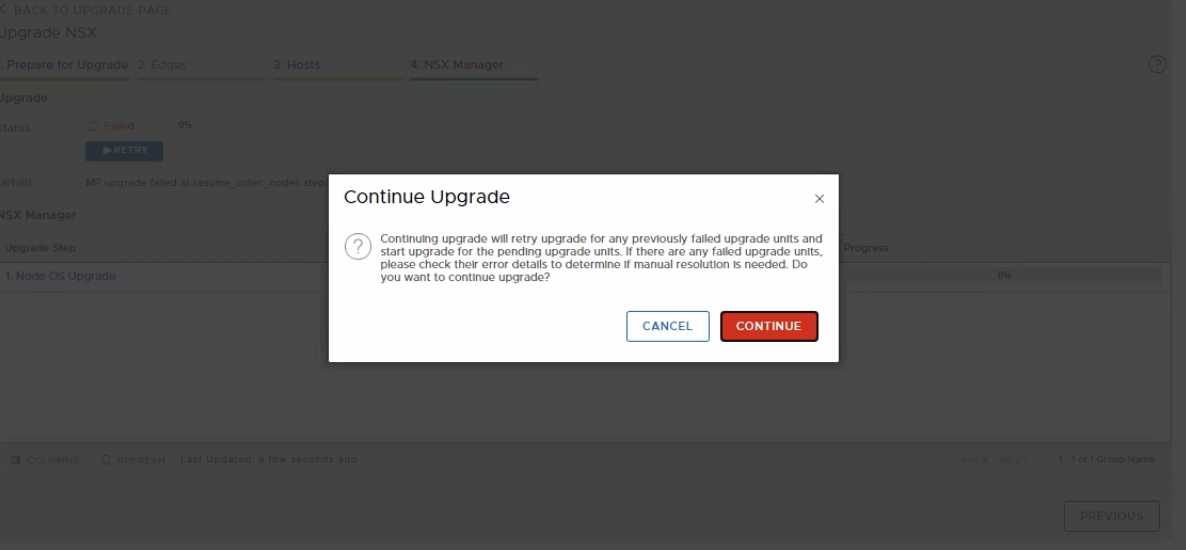
All NSX-T Appliance managers have been updated to version 3.2.0.1, but when updating the latest appliance the result was as follows:


looking in System > Lifecycle Management > Upgrade


It was not possible to connect via UI to the NSX-T manager appliances, instead via SSH, the appliances were reachables and updated, but the “get cluster status” NSX manager CLI command output clearly shows that the group status is degraded and that two nodes were down.

Solution


Disclaimer: Some of the procedures described below, may not be officially supported by VMware. Use it at your own risk.

To solve the issue I decided to keep the good NSX-T manager appliance, deactivate the cluster and deploy new appliances from the good one.
As described in this link, in the event of a loss of two of the three NSX-T Manager cluster nodes we must deactivate the cluster.
An interesting guide on NSX-T recoverability was written by Rutger Blom.

But let's proceed step by step.
  • We first need to deactivate the cluster. This operation must be performed from the good/survived NSX-T manager appliance, running the CLI command "deactivate cluster".

  • We can now, delete the NSX-T Manager appliances not good from the UI.
    If something went wrong you also need to detach the node.

  • Let's now reset the NSX-T Upgrade Plan as shown in the KB82042 via API.

    DELETE https://NSX_MGR/api/v1/upgrade-mgmt/plan

    For this to take affect, ssh to the Manager node controlling the upgrade and restart the upgrade service

    > restart service install-upgrade

  • Refreshing the UI .... we can continue with a fake upgrade, clicking on "NEXT - NEXT - DONE" until the end.
  • We have at the moment, a single and operational manager/controller node, upgraded and without error or pending tasks.

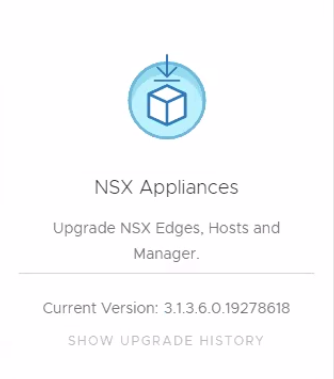
    We should be able, from here, to deploy two new NSX-T Manager appliances from the UI, join them to the active cluster node, and come back to this:


That's it.

mercoledì 30 marzo 2022

NSX-T 3.1.3.6 - Upgrade coordinator, compatibility issue to upgrade to NSX-T 3.2.0.1

Issue


Today, during the upgrade of NSX-T Data Center infrastructure from 3.1.3.6 version to 3.2.0.1 I faced out the following issue.

Verifying that everything was correctly in the compatibility matrix, loaded the .mub file I received the following error:

New NSX Upgrade version is not compatible with current NSX version, you cannot upgrade to this version

Solution


Logged into the NSX Manager CLI as root user I checked the upgrade coordinator log files /var/log/upgrade-coordinator/upgrade-coordinator.log, then I noticed the ERROR line:

Error while calling uc_helper for verification of Upgrade bundle VMware-NSX-upgrade-bundle-3.2.0.1.0.19232396.mub. See uc_helper logs

Since the log file of the uc_helper was not present in the appliance manager, I did a google search and found the KB87835 "NSX-T Manager upgrade blocked by Backup passphrase precheck (87835)"

I followed the workaround described into the KB that consist to perform next steps:
  • Download the correct uc_helper file attached to the KB. In my case 3x_to_3201_uc_helper
  • From the NSX-T UI, identify which Manager is orchestrating the upgrade.
    The upgrade UI page is only active on one Manager and this is the orchestrator node.
  • Copy the downloaded 3x_to_3201_uc_helper.py file to /image directory on the orchestrator NSX Manager node.
  • ssh to the orchestrator node as root user.
    If root access is not allowed, ssh as admin and switch to root user with the "st en" command followed by the root user password
  • Backup the file
    cp /opt/vmware/upgrade-coordinator-tomcat/bin/uc_helper.py /opt/vmware/upgrade-coordinator-tomcat/bin/uc_helper.py.bak
  • Perform remediation
    cat /image/3x_to_3201_uc_helper.py > /opt/vmware/upgrade-coordinator-tomcat/bin/uc_helper.py
  • From the NSX-T UI, retry to upload the upgrade .mub file .... and wait.


Now the Bundle file has been loaded successfully and we can continue with the UPGRADE.

That's it.

venerdì 28 gennaio 2022

Veeam ONE: Impossible to upgrade to version 11 because the upgrade process find unsupported veeam B&R version

Issue


A customer of mine fails to update Veeam ONE from version 10.0.0.750 to the latest version 11. He encounter the following error message "Veeam ONE database has one or more unsupported Veeam Backup & Replication servers. This product supports Veeam Backup & Replication 9.5 Update 4 or later."


Solution


I tried to see if there were any objects or configurations prior to version 9.5 but I didn't find anything.
The problem encountered may occur when the VBR server, added to Veeam ONE was upgraded before the Veeam ONE upgrade, so automatic upgrade is not possible.
Anyway, there is a workaround for this situation, suggested by veeam support. Is a manual product update.
To solve, follow the instructions below:

1. Make a backup of Veeam ONE database: https://www.veeam.com/kb1471 and then uninstall Veeam ONE on the server completely.

2. Install Veeam ONE v11a with the local database (SQL server express will be installed on the server)

3. After the installation, execute the script from the folder: ISO: Addins\SQLScript\VeeamOne.sql. against the existing Veeam ONE database (on the production SQL server: https://www.veeam.com/kb2312 )

4. Once the script is executed, change the database name in Veeam ONE settings and restart the services as described in the following article: https://www.veeam.com/kb1592

Thanks, to the guys at veeam support.

That's it.